

-
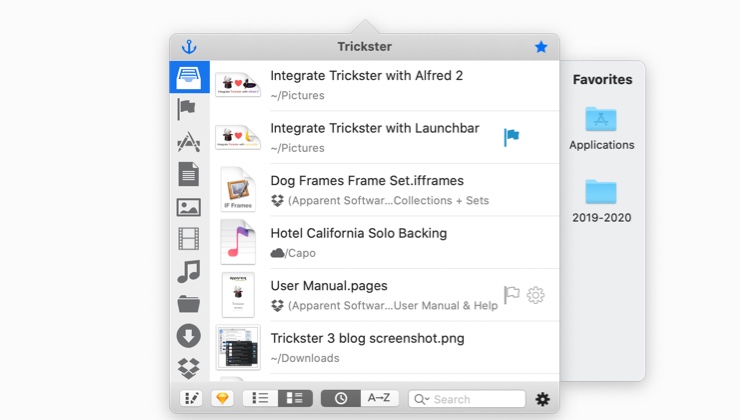
Trickster main window
-
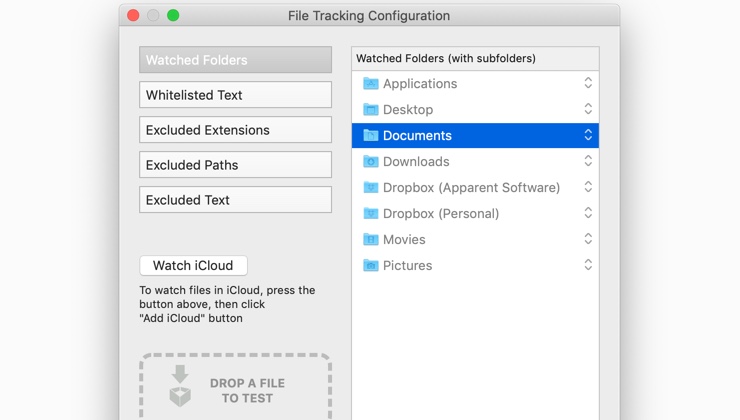
Track only what you need
Trickster keeps track of recent files you’ve been using on your Mac and gives you super easy and lightning fast access to them.
Increase productivity
- Don’t worry about where you just saved a certain file, it’s in your menu bar.
- Closed the wrong window? The document you were reading is in Trickster, one click away.
Stop searching. Start finding.
- Send email attachments faster
- Drag downloaded files directly into apps without opening finder
- Don’t worry about where applications save their files, they’re all in the same place now
Did you just download a file?
Don’t bother searching your Downloads folder, Trickster has it just one click away
Drag and Drop
Drag files from Trickster anywhere, like you would from Finder
Favorites
A sidebar to keep your favorites files and folders for even quicker access
Did you get side-tracked browsing?
Everything you worked on is still in your menu bar, ready when you are.
Efficient keyboard support
Open Trickster and perform operations from the keyboard
Advanced filters
Preset and custom filters show only what you want
“I’ve used similar apps, but none of them ever stuck for me. Trickster smooths out the process and fills in the missing features. I’m using it every day now.”
“Trickster feels really well designed. I'm pretty picky about apps that I let keep an icon in my status bar, but Trickster has earned a spot there.”
“Where Trickster does the trick for me is with its keyboard navigation.”
“Incredibly useful, nicely designed.”
“Trickster has become an indispensable part of my work and daily Mac use. Itʼs such a useful tool that I wouldnʼt want to go without. Iʼve been using it for years, and itʼs always been solid.”
-

Online User Manual
-

Trickster on Twitter
Twitter is another great way to follow our news and connect with us.
Availability and System Requirements
Trickster 3.0 or later requires macOS 10.14 (Mojave) or later
Trickster 2.8 or earlier requires macOS 10.11 or later
Trickster 2.7 or earlier requires macOS 10.8 or later